Advantages of VoIP: 10 reasons to switch to an IP PBX
If you're searching for a new business phone system, chances are you've come across the terms IP PBX and VoIP, as well as plenty more acronyms that you need to understand! Keep reading to bust that jargon and discover how IP PBX systems work.
What is an IP PBX / VoIP Phone System?
The terms IP PBX and VoIP phone system are often used interchangeably to describe a business phone system that uses Internet Protocol (IP) to transmit voice. VoIP therefore simply stands for ‘Voice over Internet Protocol’. The switchboard element of your private phone system is the PBX, which stands for private branch exchange.
An IP PBX system is the central component of most modern VoIP phone systems. These systems consist of the IP PBX server, VoIP endpoints (i.e fixed phones, web clients, or mobile apps), and optionally, a VoIP Gateway. The IP PBX server is similar to a proxy server. SIP clients, (either soft phones or hardware-based phones), register with the server, and when they wish to make phone calls they ask the IP PBX to establish the connection.
IP PBXs have a directory of all phones/users and their corresponding SIP addresses. This enables them to connect an internal call or route an external call via either a VoIP gateway or a VoIP service provider to the desired destination.
Types of IP PBX
There are two different types of IP PBX. Choosing your preferred option depends on your specific criteria and some restraints.
On-premise IP PBX
An on-premise IP PBX is just that, a system that is physically located on your premises. It uses your existing server hardware or you can purchase new hardware to run the IP PBX. Because an on-premise PBX is physically stuck in one location, it can make remote working more of a technical exercise to get right. It also means that you have a single point of failure. If the building suffers from fire or flood, the system will be offline. Finally, an on-premise system is reliant on the internet access serving your specific premises which could cause issues with call quality.
Cloud-hosted IP PBX
A hosted PBX is available as:
- a self-managed solution
- a ‘Software as a Service’ (SaaS) solution.
With both options, the cloud PBX system runs on a virtualized server environment in a supplier's data center. With both options, resiliency comes as standard, costs are lower and remote working is made easy.
Read more about the differences between a hosted PBX vs an on-premise PBX.
How does a VoIP phone system work?
At the core of your VoIP phone system is your IP PBX. The diagram below depicts the remaining components that complete your on-premise solution.
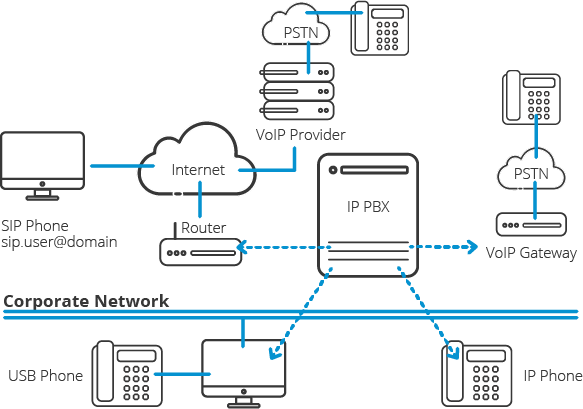
Let’s take a look at the components in more detail:
The corporate network
This is the company’s local network, through which computers running SIP clients such as softphones, and IP Phones connect directly to the PBX. In some cases, the network is divided up using virtual local area networks (VLANs) to segregate voice and data traffic to ensure call quality is not affected by a single or multiple computers downloading large files or streaming high bandwidth consuming media.
The company router/firewall
The company’s router or firewall connects to the internet and from there it can connect to remote extensions. Remote extensions include personal computers running the PBX’s softphones, remote IP Phones, mobile devices, and other PBXs connected via a bridge. The router can also connect to the PSTN network if a VoIP provider is used.
VoIP Gateway
A VoIP Gateway connects the PBX directly to the PSTN network so that you can continue to make and answer incoming calls from analog phone lines. This can be useful for businesses undergoing a phased migration to VoIP. In many countries, the legacy PSTN network has begun to be phased out by the national carriers. This gradual phasing out is due to rapid expansion requirements which cannot be catered for by an aging copper wire network.
Advantages of VoIP phone systems
One of the main advantages of an IP PBX system is cost. Aside from lower licensing fees, businesses can also save on additional costs like maintenance and support, thanks to the reduced need for on-premise hardware. Many virtual PBX systems can now be hosted in the cloud meaning that all that's required to use and administer a VoIP phone system is an active internet connection, making it the perfect solution for large and small businesses alike.
VoIP solutions are also able to leverage the power of the internet to offer advanced features that aren't possible with traditional PBX and analog phone systems. Some examples are:
10 reasons to switch to an IP PBX
1. Much easier to install & configure than a proprietary phone system
 |
An IP PBX runs as software on a computer and can leverage the advanced processing power of the computer and user interface as well as features. Anyone proficient in networking and computers can install and maintain an IP PBX. By contrast, a proprietary phone system often requires an installer trained on that particular system! |
2. Easier to manage because of web-based configuration interface
 |
An IP PBX can be managed via a web-based configuration interface or a GUI, allowing you to easily maintain and fine-tune your phone system. Proprietary phone systems have difficult-to-use interfaces which are often designed to be used only by phone technicians. |
3. Save on call costs
 |
With an IP PBX you can easily use a VoIP Provider for long-distance and international calls. The monthly savings are significant. If you have branch offices, you can easily connect phone systems between branches and make free phone calls. |
4. Eliminate phone wiring
 |
An IP telephone system allows you to connect hardware IP phones directly to a standard computer network port (which it can share with the adjacent computer). Software phones can be installed directly on the PC. You can now eliminate the phone wiring and make adding or moving of extensions much easier. In new offices, you can completely eliminate the need for wiring extra ports to be used by the office phone system! |
5. Eliminate vendor lock in
 |
IP PBXs are based on the open SIP standard. You can mix and match any SIP hardware or software phone with any SIP-based IP PBX, PSTN Gateway or VoIP provider. In contrast, a proprietary phone system often requires proprietary phones to use advanced features, and proprietary extension modules to add features. |
6. Scalability
 |
Proprietary systems are easy to outgrow. Adding more phone lines or extensions often requires expensive hardware modules. In some cases, you need an entirely new phone system. Not so with an IP PBX. A standard computer can easily handle a large number of phone lines and extensions – just add more phones to your network to expand! |
7. Better customer service & productivity
 |
Since the system is now computer-based, you can integrate phone functions with business applications. For example, bring up the customer record of the caller automatically when you receive his/her call, dramatically improving customer service and cutting costs by reducing time spent on each caller. Outbound calls can be placed directly from Outlook, removing the need for the user to type in the phone number. |
8. Triple the phone system features for half the price
 |
Since an IP PBX is software-based, it is easier for developers to add and improve feature sets. Most VoIP phone systems come with a rich feature set, including auto attendant, voice mail, ring groups, and advanced reporting. Unified Communications features are included, to support presence, web conferences, live chat and messaging, and free calls via the data network. These options are often very expensive in proprietary systems. |
9. Allow hot desking & roaming
 |
Hot desking, the process of being able to easily move offices/desks based on the task at hand, has become very popular. Unfortunately, traditional PBXs require extensions to be re-patched to the new location. With an IP PBX the user simply takes his phone to his new desk – No patching required! Users can roam too – if an employee has to work from home, he/she can simply fire up their mobile phone and are able to answer calls to their extension, just as they would in the office. Calls can be diverted anywhere in the world! |
10. Better phone usability
 |
Employees often struggle using advanced phone features. Setting up a conference, or transferring a call on an old PBX requires detailed instructions. Not so with an IP PBX – all features are easily performed from a user-friendly GUI. In addition, users get a better overview of the status of other extensions, of inbound calls, call queues, and presence via the apps. Proprietary systems often require expensive “system” phones to get an idea of what is going on on your phone system and even then, status information is cryptic at best. |
Why choose 3CX’s IP PBX as your business VoIP phone system?
3CX is an IP PBX with a difference: as the most flexible solution on the market you can configure your phone system to suit your business's individual requirements:
Alternative IP PBX software providers
The market for VoIP PBX software is growing. Alternative IP PBX providers include:
When comparing alternative PBX software providers, remember that not all providers own the end-to-end system. Many newcomers offer ‘build-ups’ that utilize another platform’s technology. As a result, if your PBX experiences an issue, you can be left waiting for middlemen to find a solution. 3CX owns the end-to-end PBX solution meaning issues can be resolved efficiently with minimal downtime and disruption.
Open source IP PBX alternatives
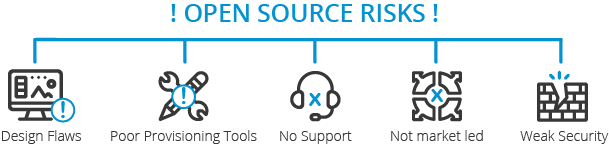
If opting for an open-source alternative there are many available. However, it is important to keep in mind that an Asterix platform or similar is likely to experience issues that affect user experience and useability:
Choosing open standards PBX software is safer and more reliable than risking your communications with an open-source solution. You’ll still be able to tailor your solution but without the risk of something going wrong.